
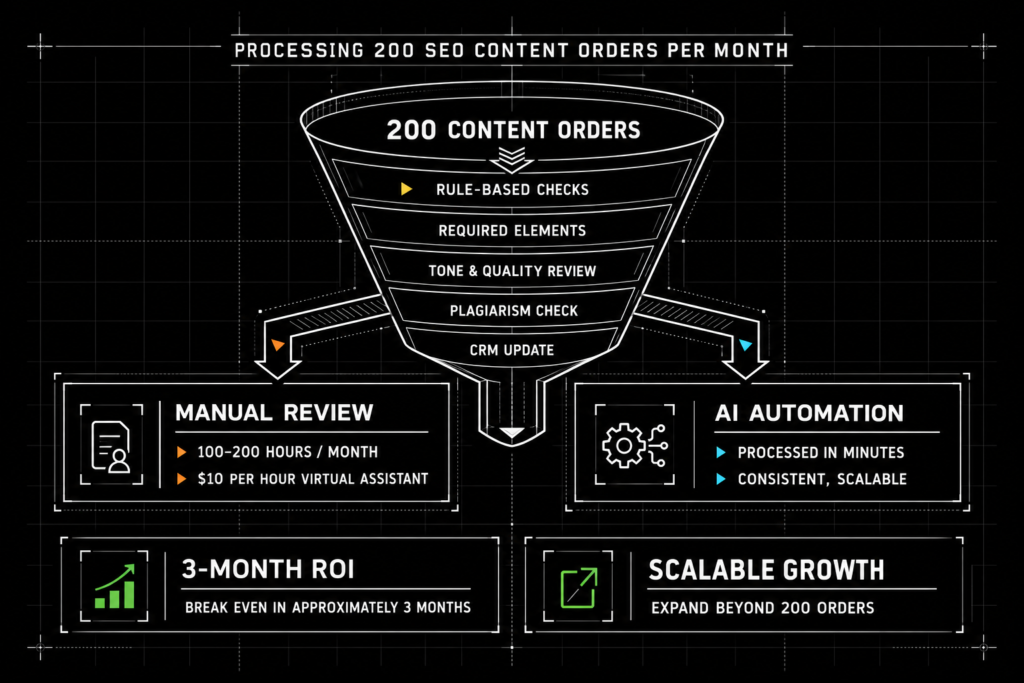
This case study shows how AI process automation replaced manual admin review work typically handled by virtual assistants.
By automating rule-based checks and validation workflows, the business eliminated 100–200 hours of monthly admin effort, reduced costs by $1,000–$2,000 per month, and scaled operations without adding staff.
The result is faster turnaround, consistent quality, and predictable operations.
Case Study at a Glance
| Area | Result |
|---|---|
| Monthly volume | Approximately 200 SEO content orders |
| Manual effort eliminated | 100–200 hours per month |
| Estimated monthly labor savings | Approximately $1,000–$2,000 |
| Capacity improvement | 2–3× more orders without additional staff |
| Issue detection | More than 95% before client delivery |
| Rework reduction | Approximately 70–90% |
| Estimated payback period | Approximately three months |
How Manual Administrative Review Work Breaks Down at Scale
Most growing businesses do not struggle because they lack ideas or effort. They struggle because critical admin work quietly eats time every day.
Reviewing documents, checking rules, validating quality, and making sure work meets internal standards often falls to a virtual assistant.
It works at first.
Then volume increases, rules change, and consistency slips.
This is where AI process automation becomes a practical replacement, not an experiment. Instead of adding headcount, businesses can automate review and validation work using repeatable rules and AI-assisted decision support.
This case study shows how manual admin review work was replaced with an AI-powered workflow, removing dependency on human review while improving speed and consistency.
Administrative Review Tasks That Slow Business Operations
Admin review tasks rarely show up as major line items. They live in the gaps between systems.
Where Manual Review Creates Operational Drag
| Administrative task | Why it becomes a problem at scale |
|---|---|
| Checking content or documents against established rules | Every additional order creates another review cycle |
| Verifying that required elements are present | Small omissions create additional review and follow-up |
| Evaluating tone, sentiment, or quality thresholds | Results may vary between reviewers |
| Sending feedback and approvals | Communication becomes fragmented across email and chat |
| Updating shared files and records | Manual updates create delays and inconsistent information |
Individually, these tasks feel small. Collectively, they create delays, rework, and hidden operational drag.
As volume grows, the problem compounds. More items require review. More exceptions appear. More follow-ups are needed. The admin workload grows faster than the business expects.
This is the exact category of work that administrative workflow automation and automated review workflows are designed to replace.
Why Virtual Assistants Are Commonly Used for Administrative Review Tasks
For most small and midsize businesses, hiring a virtual assistant is the fastest way to offload admin work.
Virtual assistants are typically asked to:
- Follow established checklists
- Apply rules consistently
- Flag issues
- Route items for approval
- Update business systems
- Communicate Feedback
The model works when volume is low, and rules are simple.
It breaks down when rules evolve, speed becomes critical, or consistency matters across large volumes.
At that point, the business is no longer managing people. It is managing process failure.
This is where AI process automation becomes a structural improvement instead of a staffing decision.
The objective is not to eliminate valuable human judgment. It is to reduce the time people spend applying the same repeatable rules over and over.
When Manual Admin Review Becomes an Operational Bottleneck
As order volume increases, manual review stops being a support function and starts becoming a constraint.
In this case, the business was processing approximately 200 SEO content orders per month.
Each order required multiple manual steps.
The Original Review Requirements
| Stage | Manual work required |
|---|---|
| Order setup | Create and organize order specifications |
| Content validation | Check word count and keyword requirements |
| Structural review | Confirm proper heading structure |
| Originality review | Run and review plagiarism checks |
| System administration | Update CRM records and order statuses |
| Feedback | Communicate failures, corrections, and approvals |
Individually, these steps were manageable. At scale, they consumed 100–200 hours per month of repetitive admin work.
The bottleneck was not creativity or strategy. It was review and validation.
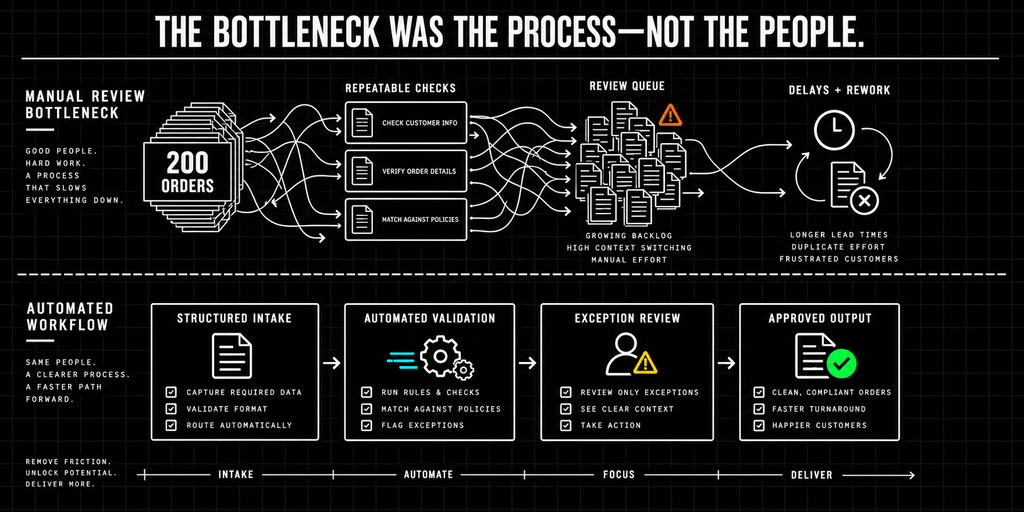
Hiring additional virtual assistants would have increased cost and complexity without fixing the underlying issue: the work itself was rule-based and repeatable.
AI Process Automation Approach for Admin and Review Workflows
Instead of adding headcount, the business implemented AI process automation to replace manual admin review work.
The goal was not to automate creativity. It was to automate decision enforcement.
The system was designed around two principles:
- Structured Inputs: Every order should be structured and machine-readable
- Consistent Validation: Every validation should be consistent and automatic
This approach resulted in an AI-powered workflow that could ingest orders, validate delivered content, and update operational systems without human intervention.
AI Process Automation Case Study: Replacing Manual Admin Review
The Original Process
Before automation, the workflow relied heavily on manual effort:
- Order details were created and tracked manually
- Virtual assistants reviewed content against written requirements
- Keyword placement, word count, and heading structure were checked by hand
- Feedback was sent via chat
- CRM updates were performed manually
Quality depended on the individual performing the review. Speed depended on availability.
The Automated Workflow
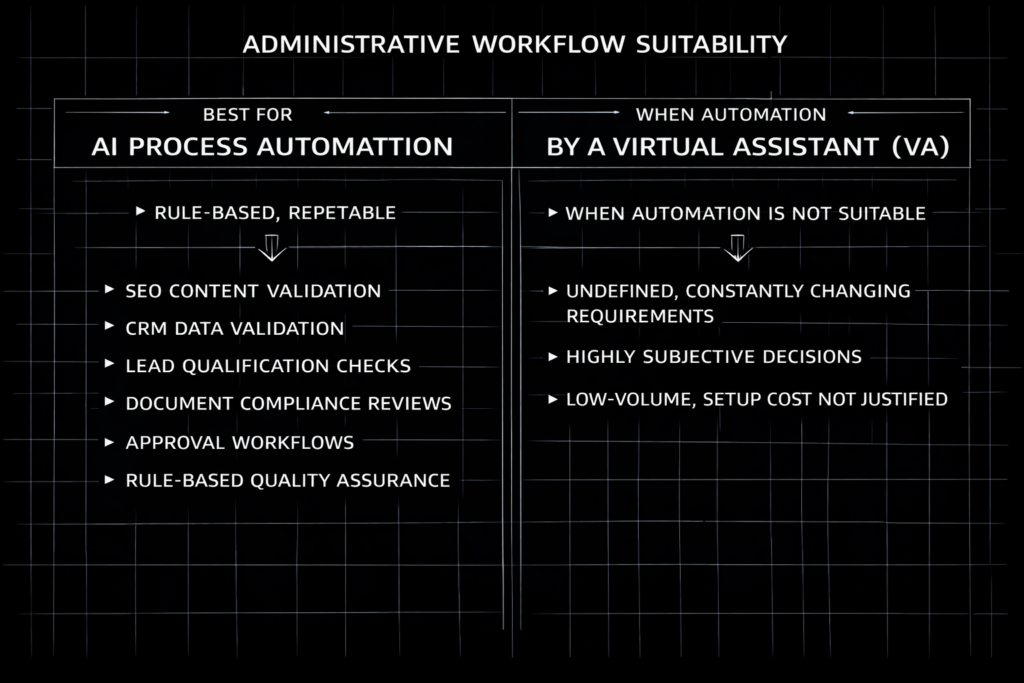
With automation in place, the process changed fundamentally.
- Order Intake
- Each new order automatically generated a structured Google Sheet containing all requirements
- Contacts and opportunities were created automatically in GoHighLevel
- Content Validation
- Delivered content was parsed and validated against the original order
- Word count, keyword usage, and heading structure were checked automatically
- Plagiarism checks were run as part of the workflow
- Keywords were highlighted directly in documents for visual verification
- System Updates
- Validation results updated CRM status automatically
- Failed checks generated clear error reports
The entire review process was reduced from hours to minutes.
What Changed After Automation
The impact was immediate and measurable:
- 100–200 hours per month of manual work eliminated
- $1,000–$2,000 per month in labor cost savings (based on a $10/hour virtual assistant)
- 2–3x increase in order capacity without adding staff
- 95%+ issue detection rate before client delivery
- 70–90% reduction in rework
Review quality became more consistent. Turnaround became more predictable. The business could handle additional order volume without creating a proportional increase in administrative workload.
The process also gave team members more time to focus on exceptions, customer needs, and work requiring judgment.
AI Process Automation vs Manual Administrative Review
Manual review generally scales with the number of people performing it. Automation can process additional volume without requiring staffing to increase at the same rate.
| Area | Virtual Assistant | AI Process Automation |
| Cost | Increases with volume | Largely fixed |
| Speed | Hours per order | Minutes per order |
| Consistency | Varies by reviewer | Enforced by rules |
| Availability | Business hours | 24/7 |
| Scalability | Requires hiring | Scales automatically |
In this case, platform costs were recovered over approximately three months through labor savings alone.
That does not mean automation is always less expensive or appropriate for every process.
The business case depends on volume, complexity, exception rates, labor costs, and how clearly the workflow can be defined.
Business Processes That Benefit from AI Process Automation
Although this case focused on SEO content validation, the pattern applies to many types of administrative work.
Other Processes That May Benefit From Automation
| Process | Example automation opportunity |
|---|---|
| CRM data validation | Identify missing, inconsistent, or duplicate records |
| Lead qualification | Evaluate leads against established eligibility rules |
| Document compliance | Check files for required content or formatting |
| Approval workflows | Route items based on status, value, or ownership |
| Quality assurance | Apply consistent rule-based checks before delivery |
Any process that relies on repeatable checks and manual enforcement is a candidate for automation.
The most suitable processes usually have:
- Clearly defined requirements
- Consistent inputs
- Repeatable decisions
- Meaningful processing volume
- Identifiable exceptions
- A measurable cost or time burden
When AI Process Automation Is Not the Right Solution
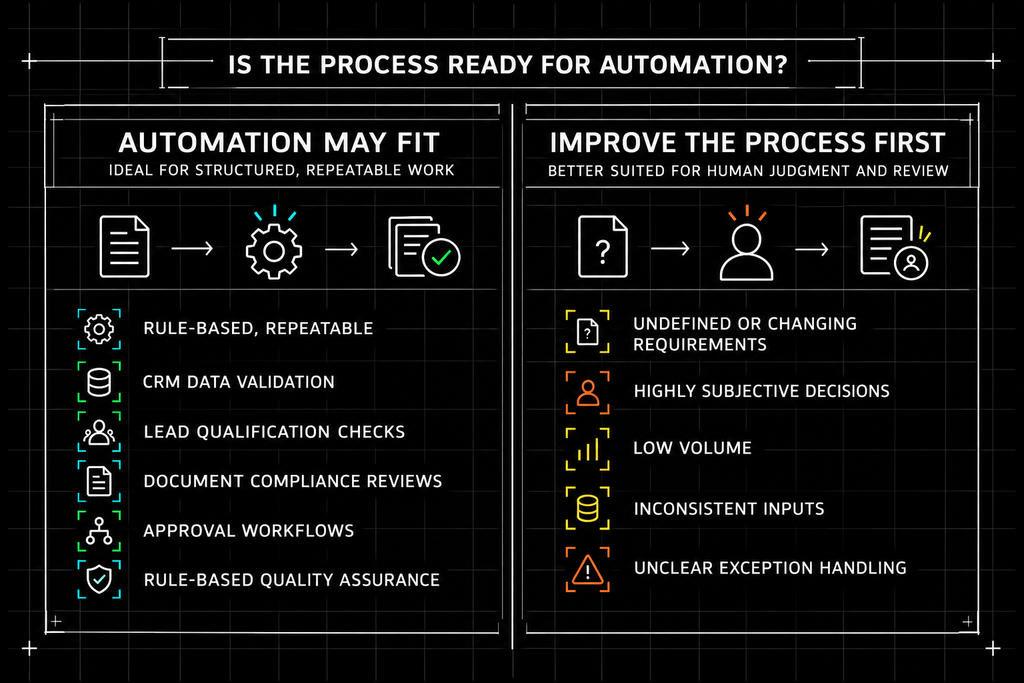
Is the Process Ready for Automation?
| Automation may be appropriate when… | Improve the process first when… |
|---|---|
| Requirements are clearly documented | Requirements are undefined or constantly changing |
| Decisions follow repeatable rules | Decisions are primarily subjective |
| Volume is high enough to justify implementation | Volume is too low to produce meaningful value |
| Inputs are structured or can be standardized | Information arrives in inconsistent formats |
| Exceptions can be identified and routed | Nobody agrees on how exceptions should be handled |
In these cases, improving the process should come before automating it.
RULE OF THUMB
If a process cannot be explained consistently, it probably cannot be automated reliably.
Frequently Asked Questions About AI Process Automation
Can AI process automation replace a virtual assistant?
Yes, when the work is rule-based and repeatable. Tasks like validation, quality checks, data verification, and routing are better handled by AI process automation than by a virtual assistant because automation applies the same rules every time without fatigue or inconsistency.
What administrative tasks are best suited for AI automation?
AI process automation works best for admin tasks that follow clear rules. Common examples include document review, content validation, CRM data checks, lead qualification, approval workflows, and compliance verification.
Is AI process automation cheaper than hiring a virtual assistant?
In most cases, yes. While there is an upfront setup cost, automation replaces dozens or hundreds of monthly labor hours. In this case study, the business replaced work previously handled by a $10/hour virtual assistant, saving approximately $1,000–$2,000 per month and reaching ROI in about three months.
When should a business not automate admin work?
Automation is not a good fit when requirements are undefined, decisions are highly subjective, or volume is too low to justify setup. In those cases, improving the process should come before automation.
AI Automation Services for Administrative Workflows
If your business relies on virtual assistants to perform repetitive review or validation tasks, automation may be a better long-term solution.
We help teams evaluate where AI process automation makes sense and where it does not.