
In the digital-first era, your website is more than just a digital brochure; it’s your 24/7 salesperson. But having a sleek design isn’t enough if it doesn’t convert visitors into customers.
If you’re seeing traffic but no emails, or clicks but no calls, it’s time to shift your focus to website lead generation optimization.
At Simplified, we believe tech should work for you, not against you. Here is our simplified, step-by-step guide to turning your website into a lead-generating machine using the latest SEO and conversion best practices.
Start with High-Intent Keyword Research
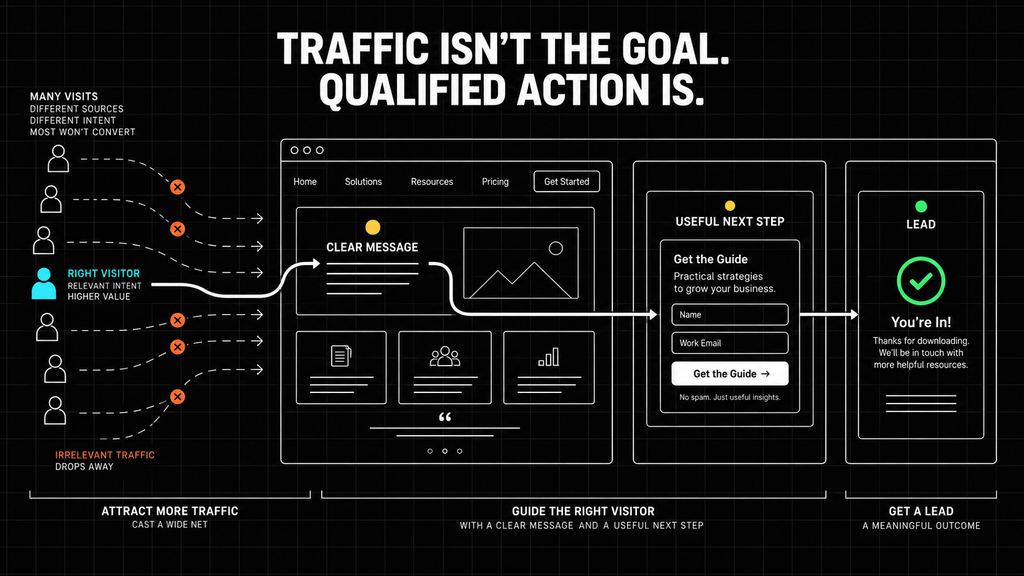
To get leads, you need the right traffic. SEO has moved beyond broad terms toward search intent.
Instead of ranking for “web design,” you want to rank for “best B2B website lead generation strategies.”
- Focus on Long-Tail Keywords: Use phrases that reflect a problem. Example: “how to optimize website for leads” or “conversion rate optimization for small business.”
- “Target problem-solving intent”: Create content for users who have a specific pain point and are looking for a solution.
| Broad keyword | More specific, high-intent keyword |
|---|---|
| Web design | How to optimize a website for leads |
| Business software | Software solutions for growing businesses |
| CRM | CRM implementation for a small business |
| Automation | Automate repetitive administrative work |
Master the “Golden First Fold”
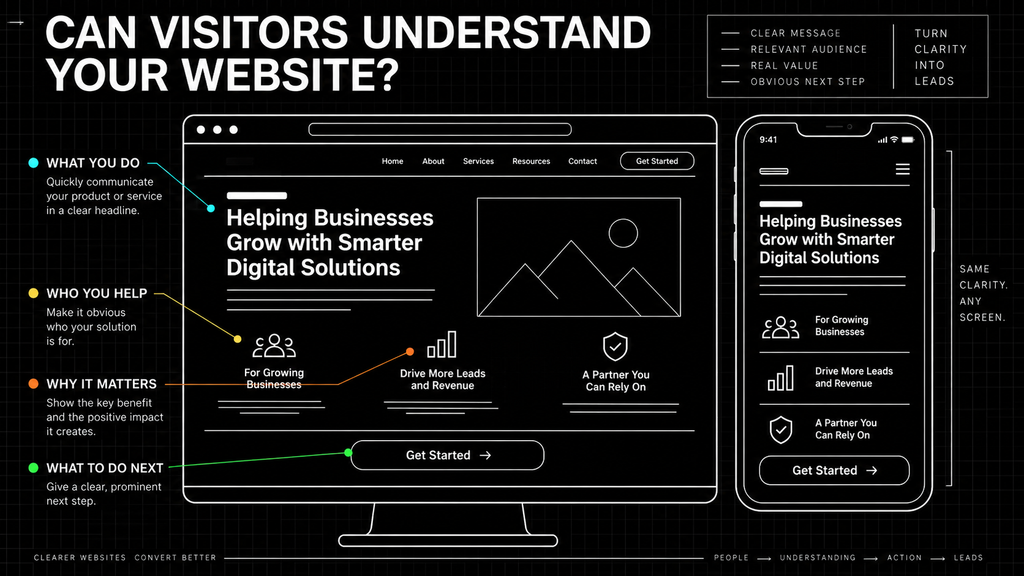
When a user lands on your website, you need to communicate what you do and what the visitor should do next as quickly as possible. This is your “Above the Fold” area.
- Clear Value Proposition: Use a strong H1 header that explains the benefit you provide.
- Strong Call to Action (CTA): Your “Contact Us” or “Get a Quote” button should be easy to identify and understand.
First-Screen Clarity Check
| Element | Question to ask |
|---|---|
| Headline | Does it clearly explain what we help customers accomplish? |
| Supporting copy | Does it clarify who the service is for? |
| Value | Does the visitor understand why the offer matters? |
| CTA | Is the next step clear and relevant? |
Implement “Answer Engine Optimization” (AEO)
With the rise of AI-driven search (like Google’s AI Overviews), your content needs to be easy to understand and extract.
- Provide direct answers: Start important sections with a clear answer to the user’s primary question.
- Use schema markup where appropriate: Schema can help search engines better understand information about your services, organization, articles, reviews, and frequently asked questions.
- Use descriptive headings: Organize content with headings that clearly communicate what each section explains.
Leverage Content Pillars and “Spokes”
Don’t just write random blogs. Build topical authority.
- The Hub: A comprehensive guide on a broad topic (e.g., Technology Basics for Growing Businesses).
- The Spokes: More focused blog posts that explore specific parts of the broader topic, such as business tech stacks, automation, integrations, or lead-generation optimization.
Internal linking helps readers continue exploring relevant information, helps search engines understand how your content is connected, and boosts your rankings across the board.
How the Content Model Works
| Content type | Purpose |
|---|---|
| Hub | Provides a broad, comprehensive overview |
| Supporting article | Answers a specific related question |
| Case study | Demonstrates how a solution worked in practice |
| Service page | Connects the topic to an available solution |
Speed and Mobile-First UX
In 2026, a slow site is a dead site. A slow or difficult website can prevent visitors from engaging with your content or taking the next step. Technical performance is an important foundation for both search visibility and lead generation.
- Interaction Speed: Make sure your website loads and responds efficiently.
- Mobile Experience: Most leads are generated on mobile devices. Ensure your forms are easy to fill out with a thumb and don’t require excessive typing.
- Form simplicity: Avoid asking for more information than your team needs to begin the conversation.
Trust Signals and E-E-A-T
Search engines now prioritize Experience, Expertise, Authoritativeness, and Trust (EEAT). Simply, this means search engines and potential customers both look for indications that a business is experienced, credible, and trustworthy.
- Social proof: Include real testimonials, relevant case studies, or examples of completed work.
- Author profiles: Ensure every blog post has a real author with credentials. This information helps readers understand the experience behind the content. Google ranks brands and people, not just anonymous pages.
- Specific results: When possible, support claims with measurable outcomes or concrete examples.
- Clear company information: Make it easy for visitors to understand who you are and how to contact you.
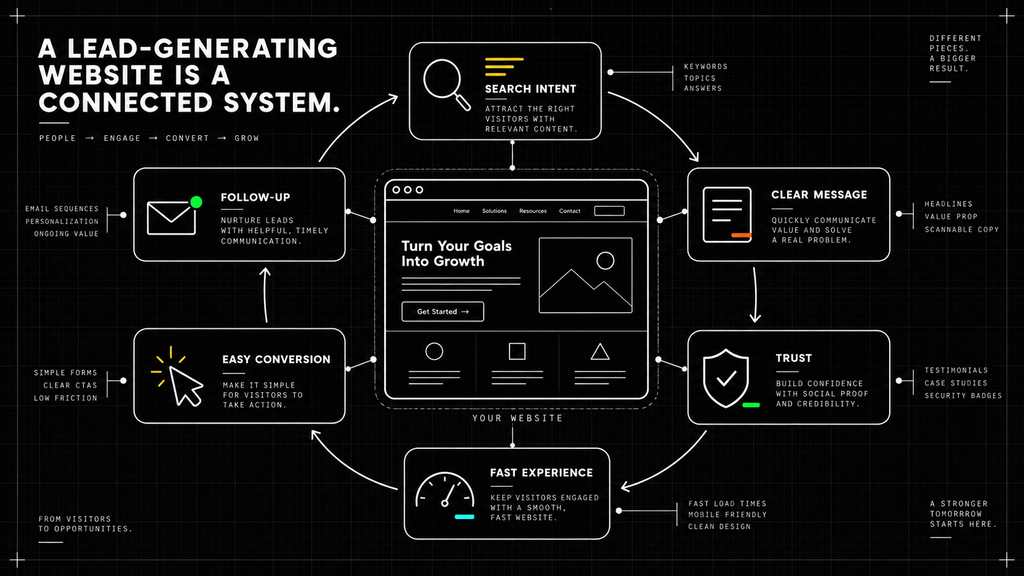
Connect Website Leads to a Reliable Follow-Up Process
Generating a form submission is only part of the process. Every new inquiry also needs to reach the correct person or system so the business can respond.
Review what happens after someone submits a form:
- Does the lead enter your CRM or contact system?
- Is the appropriate team member notified?
- Does the visitor receive confirmation?
- Is the source of the inquiry recorded?
- Is there a clear follow-up responsibility?
A website can generate interest and still lose opportunities when the follow-up process depends on someone noticing an email or manually moving information between systems.
Summary Checklist for Lead Generation Success:
- [ ] Is your Primary Keyword in the first 100 words of your page?
- [ ] Do you have a Lead Magnet (like a free ebook or consultation) to capture emails?
- [ ] Are your Headings (H2/H3) structured as questions people actually ask?
- [ ] Is your CTA visible on every single page of your site?
Ready to Simplify Your Growth?
Optimizing your website for leads doesn’t have to be complicated.
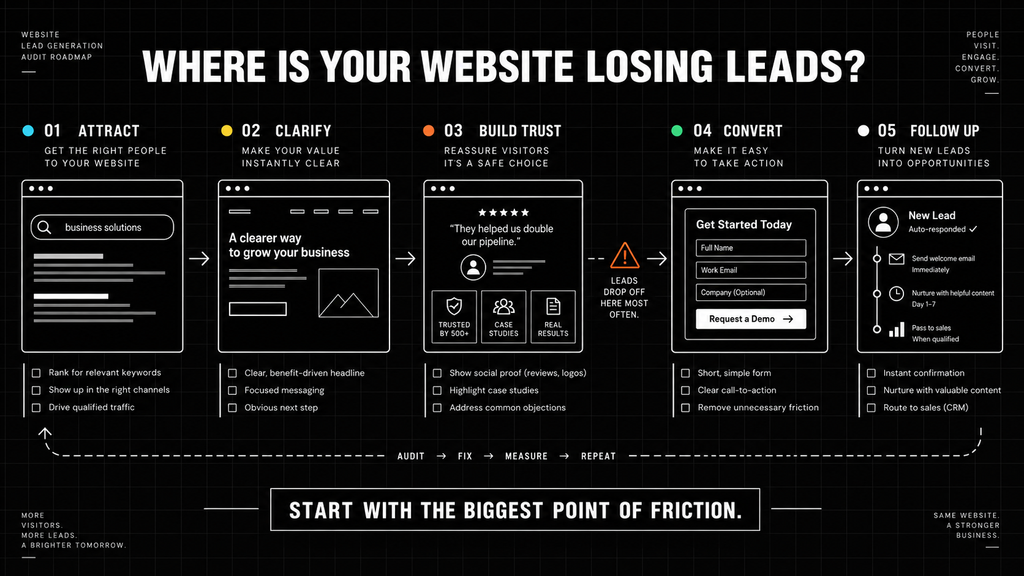
By focusing on search intent, clear communication, a usable experience, meaningful trust signals, and reliable follow-up, you can help your website become a more valuable part of your business.
Want a professional audit of your site’s lead generation potential?
Contact Simplifie today and let’s grow your business together.