
In residential construction, especially in North Texas, it doesn’t take much to lose a good lead.
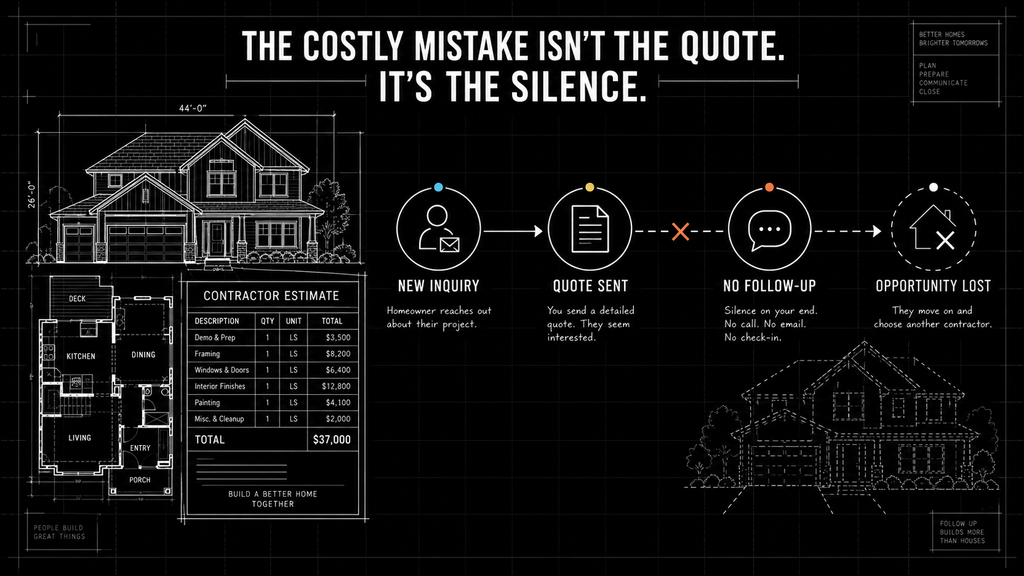
You think the quote went well. The homeowner seemed interested. Then – crickets. Days go by, and nothing happens.
If this sounds familiar, you’re not alone. The truth is, many contractors are missing out on work because of a costly but straightforward oversight: poor or inconsistent construction lead follow-up.
This post is for owners, project managers, and operators who want to close more jobs without juggling more tech. We’ll show you the real reasons why leads go cold and the surprisingly simple solution that works quietly in the background.
Why Lead Follow-Up Fails in Construction
Your crew shows up on time. You deliver fair quotes. You run a solid operation.
But if your lead follow-up isn’t consistent and timely, your chances of winning that job drop fast.
What Happens to Leads When You Wait Too Long
| Days Without Follow-Up | Lead Conversion Likelihood |
|---|---|
| Day 1 | 60% |
| Day 3 | 35% |
| Day 5+ | Under 10% |
Most contractors don’t lose jobs because of pricing or poor workmanship. They lose them because they didn’t respond fast enough or didn’t follow up at all.
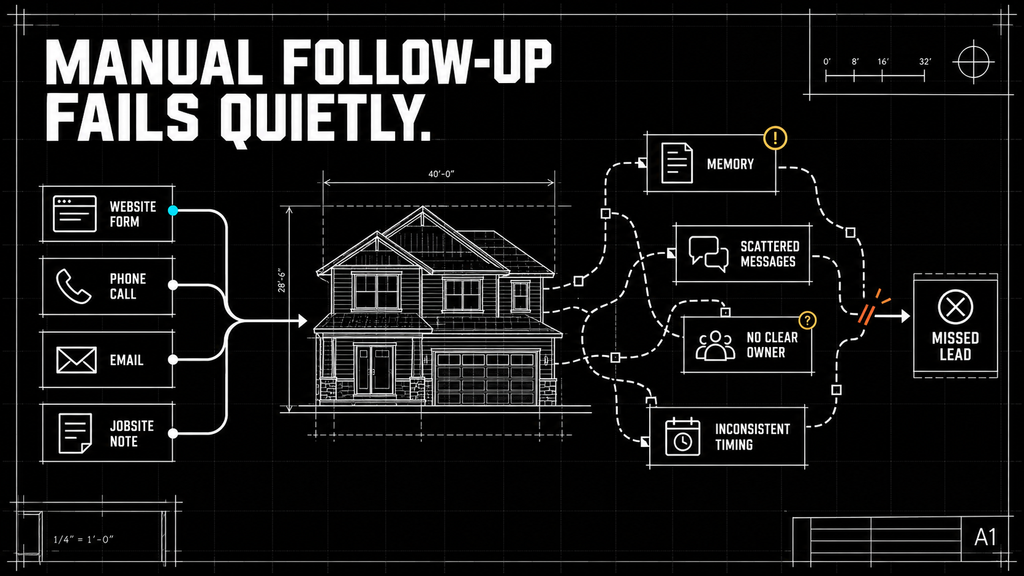
Some builders use spreadsheets. Others rely on memory or paper notes. A few try to stay organized with texts and emails.
But eventually, leads slip through the cracks.
And once that homeowner calls another contractor who answers quickly, you’re out.
What Owners and Managers Are Really Searching For
Whether they know it or not, many construction professionals are asking the same questions:
“What’s the best way to ensure I follow up with every lead?”
- You can’t afford to let hot leads sit. Every day you wait, your chances of conversion drop. Builders are searching for easy ways to make follow-up automatic – without having to remember or do it manually.
“Is there a way to organize my leads without getting bogged down in software?”
- Things get messy if you’re managing leads from your phone, email, website forms, and jobsite conversations.
- You want a simple construction lead follow-up system that doesn’t require new logins or steep learning curves.
“Why aren’t my quotes converting into signed jobs?”
There may be several reasons:
- You might be quoting too late
- Or following up inconsistently
- The homeowner did not understand what happened next
- Or not qualifying your leads early enough
- Questions or objections were never addressed
That brings us to the core issue: a follow-up process that depends entirely on manual effort becomes harder to maintain and doesn’t scale as the business grows.
The Real Mistake: Doing Follow-Up Manually
Manual lead follow-up is the biggest mistake most contractors make. It sounds simple, but here’s why it breaks down:
Manual Follow-Up Challenges
| Challenge | What happens |
|---|---|
| The process depends on memory | Follow-ups are missed when the day gets busy |
| Jobs run long, or emergencies appear | Sales conversations are pushed behind immediate jobsite needs |
| Messages live in different places | It becomes difficult to see the complete conversation |
| Timing is inconsistent | Some leads receive several messages while others receive none |
| The business grows | More leads create more administrative work |
Even the most organized contractors eventually miss a message, lose track of a number, or forget who they were supposed to call.
Unlike jobsite issues you can see, construction lead follow-up mistakes happen silently – you don’t even know you lost the job.
A Smarter Way: What Good Construction Lead Follow-Up Looks Like
You don’t need a CRM or some high-end sales tool to fix this.
You just need a better process and a tool that can run it without getting in your way.
Sample Lead Follow-Up Timeline
| Day | Action |
|---|---|
| Day 0 | Instant text or email: “Thanks for reaching out” |
| Day 1 | Personalized check-in or short call |
| Day 3 | Reminder with helpful info (FAQs, testimonials) |
| Day 7 | Final nudge with a reason to act now |
| Day 30+ | Occasional long-term check-in |
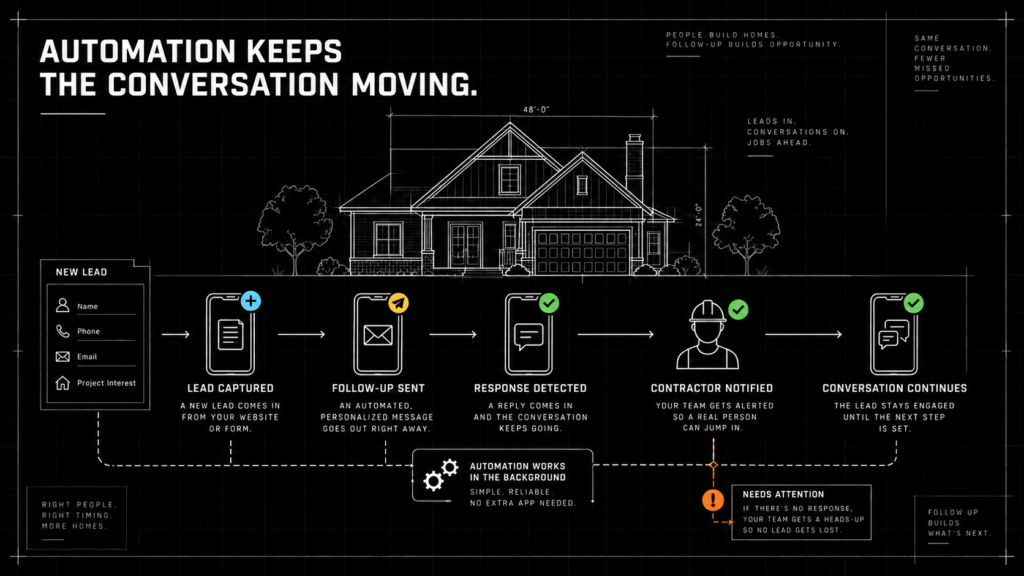
When this process runs automatically in the background, you no longer rely on your memory or add more work to your day.
How Automation Quietly Fixes the Construction Lead Follow-Up Problem
This is where automation tools come in – not big, flashy platforms, but lightweight systems that:
- Log incoming leads automatically
- Trigger personalized follow-ups by text or email
- Notify you only when a lead responds or needs attention
- Keep all lead communication in one place
Instead of more dashboards or apps, this tool feels more like a quiet assistant who never forgets a follow-up.
Comparison: Manual vs. Automated Follow-Up
| Area | Manual follow-up | Automated support |
|---|---|---|
| Daily effort | Requires someone to track every next step | Routine messages and reminders can run automatically |
| Timing | Can be delayed by other priorities | Predefined messages can be sent consistently |
| Conversation history | May be spread across phones, inboxes, and notes | Communication can be connected to one lead record |
| Team attention | Someone must continually check for activity | The team can be notified when a response needs attention |
| Scalability | Additional leads create more manual work | Routine steps can support a larger volume |
Common Construction Lead Follow-up Questions
Contractors like you are actively searching for answers. Here are the related phrases we see often – and what the question really means. Knowing what others are asking can help you spot gaps in your own process, avoid common mistakes, and get ahead of competitors who are still struggling with the same issues. Here is what your competitors are asking:
What is the best follow-up system for contractors and builders?
The best contractor follow-up system is one your team can use consistently. It should capture leads from your website, phone, email, and referrals; record the last conversation; show what needs to happen next; and send reminders or messages without requiring constant manual updates.
For some builders, that may be a simple CRM. For others, it may be a lightweight automation system connected to tools they already use.
How can contractors keep track of leads without complicated software?
Start with one dependable place to record each lead’s contact information, project needs, source, last interaction, next follow-up date, and assigned owner.
A spreadsheet may be enough when lead volume is low. As the business grows, a connected lead-tracking or automation system can reduce duplicate entry and prevent inquiries from becoming scattered across phones, inboxes, and paper notes.
How do I turn construction leads into signed jobs?
Turning construction leads into signed jobs requires more than sending a quote. Contractors need to respond promptly, understand the project, qualify the opportunity, explain what happens next, address questions, and continue following up while the homeowner makes a decision.
The goal is not to create a high-pressure sales process. It is to make the homeowner’s next step clear and keep promising conversations from going quiet.
Is there a contractor CRM that does automated follow-up for me?
Yes. Many contractor CRMs can send acknowledgments, schedule follow-up messages, create reminders, organize communication, and notify the team when a lead responds.
However, the best solution is not always a new CRM. A lightweight automation layer may be able to connect your existing website, email, calendar, and contact system without adding another complicated platform.
How quickly should a contractor follow up with a new lead?
Contractors should acknowledge a new inquiry as soon as reasonably possible while the homeowner is actively considering the project. An immediate confirmation can reassure the homeowner that the inquiry was received, but personalized follow-up should still come from a real person.
The exact timing should reflect your lead source, project type, business hours, and team capacity.
What should a construction lead follow-up message include?
A construction lead follow-up message should acknowledge the homeowner’s project, reference the previous conversation or quote, and provide one clear next step.
Avoid sending a generic “just checking in” message without context. A stronger follow-up might offer to answer questions, clarify part of the estimate, explain scheduling, or arrange a short call.
These are real pain points from business owners who want results, not software.
Simplify and Streamline with Smart Automation
Simplify and Streamline with Smart Automation
Discover how Simplified helps you
cut through chaos, streamline workflows,
and get reliable results, without the hassle
of extra tech or new apps.
Schedule a call to learn more
What a Simple, Smart System Can Do for You
By switching to a background automation system for construction lead follow-up, here’s what changes:
1. More Jobs Closed
- Following up fast improves trust
- You stay top-of-mind when the homeowner is ready to decide
2. Less Wasted Time
- Stop chasing cold leads manually
- Focus on hot leads who are engaging
3. Improved Professionalism
- Automated messages can be branded with your company name and style
- Responses feel consistent and reliable
4. Less Mental Overload
- You don’t have to remember who to call
- You don’t waste time digging through past texts and emails
Final Takeaway: Follow-Up is Too Important to Leave to Chance
You already do the hard part – delivering quality work, managing crews, coordinating projects, and keeping customers informed.
But if your construction lead follow-up and management process isn’t reliable, you’re leaving money on the table.
The solution is not automatically more applications or more administrative work. It’s a behind-the-scenes system that does the follow-up for you – automatically.
If you’re tired of chasing leads or wondering why your quotes don’t convert, it’s time to let your follow-up run itself. No more guesswork. No more missed opportunities.
Need help simplifying your lead follow-up?
Simplified helps North Texas builders evaluate and improve how leads move from the first inquiry to a real conversation by helping automate the lead process- quietly, reliably, and without disrupting your workflow.
We can help identify:
- Where leads are being lost
- Which steps should remain personal
- Which reminders or messages can be automated
- How follow-up can work with your existing tools
- What level of technology is actually necessary
Let’s talk about what a simpler lead follow-up process could look like for your business.